




My First Automation
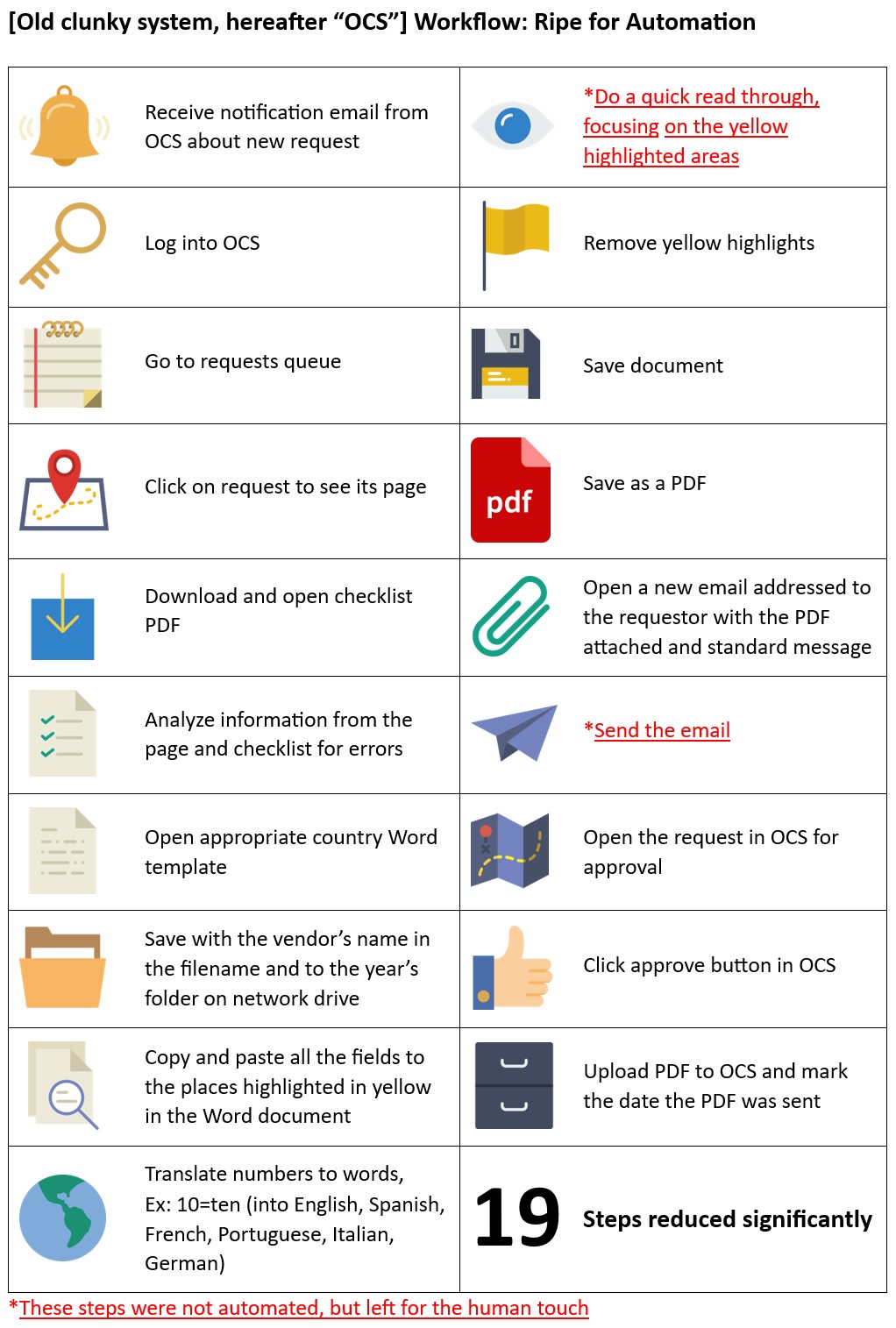
Here's the story of my first automation when I was a corporate lawyer. This was back in 2016. I was doing loads of manual work. But here's the thing. I had studied computers before law school and so I knew how to program.
I realized there were tons of patterns in my work. If only I could learn how to program in Microsoft Office. So I did a search on Google: "How to automate Microsoft Office". That search changed my career trajectory.
Back then all we had was this thing called VBA macros inside of Excel. But boy was it powerful. I hated the language. It was so old and poorly made. Apparently Microsoft hated it too as they've now created much better ways to automate inside their products. But VBA was all I had back then.
So I opened Excel. I placed a button. I opened up a VBA editor and I placed my very first line of code which opened Internet Explorer on my computer. Internet Explorer was the only browser that worked for this Old Clunky System that I had to use. It used proprietary Java Applets or something that only worked in Internet Explorer.
It worked. Internet Explorer was open on my computer. My next line of code opened the website for Old Clunky System. My next lines moved the cursor to the username field, filled in my username, then the password field, and finally clicked the log in button.
It took me two months in my spare time to figure out all 19 steps of my workflow. I was busy with my mountains of manual work, but I saw the vision that what I was putting in place was an investment that would free me up forever more.
My automation next went to my requests queue, clicked on the appropriate one, scraped data from the screen, downloaded an attached PDF and scraped all the data from it. It then compared the scraped data and the data from the PDF to make sure they were sufficient and did not conflict. If there was something wrong, the automation opened a new email in Outlook and wrote my message to the requester and told them how the data in the request was wrong and they should submit it again. And it attached the PDF to the email.
If all data was in order, the automation opened the appropriate contract template for the country and saved a copy to my repository with the name of the vendor and year in the file name. There were several fields in the contract template highlighted in yellow and the automation automatically filled them in with all the data points.
I even translated numbers to words like lawyers like to do. I found code online for converting all numbers up to a million into English words. So then I tweaked the code so it would work in Spanish, French, Portuguese, Italian, and German.
This was a huge timesaver for me already. So far I had a Word document automatically filled in with the fields still highlighted in yellow. So I left this step manual for me to do a quick scroll through the document focusing on the yellow highlights just to make sure the requester didn't make an obvious mistake that computers can't find. Like putting in the name Mickey Mouse.
Once I was happy I clicked a button in my spreadsheet and it removed the yellow highlights, saved the document, saved it as a PDF, opened a new email addressed to the requester with the PDF attached and a standard message inserted.
I then had to click Send in Outlook because, well, I wanted to leave something for me to do.
The automation opened the request in the Old Clunky System and clicked the approve button and uploaded the PDF to Old Clunsky system and marked the date the PDF was sent.
19 steps reduced significantly.
Conclusion
What do we learn from this? Anyone motivated enough can find tools and learn how to use them. I would actually not recommend this approach anymore. In late 2016 Microsoft announced Power Automate which runs entirely in the cloud. Thus no clunky VBA in a spreadsheet taking control of the user's computer.What else do we learn? It's best when someone with intimate knowledge of every step and is in control of them is in charge of automating the process. The specific technology ultimately doesn't matter. Work out your workflow and your data flows and then use whatever tools are right for the job.