




HSL Color Model
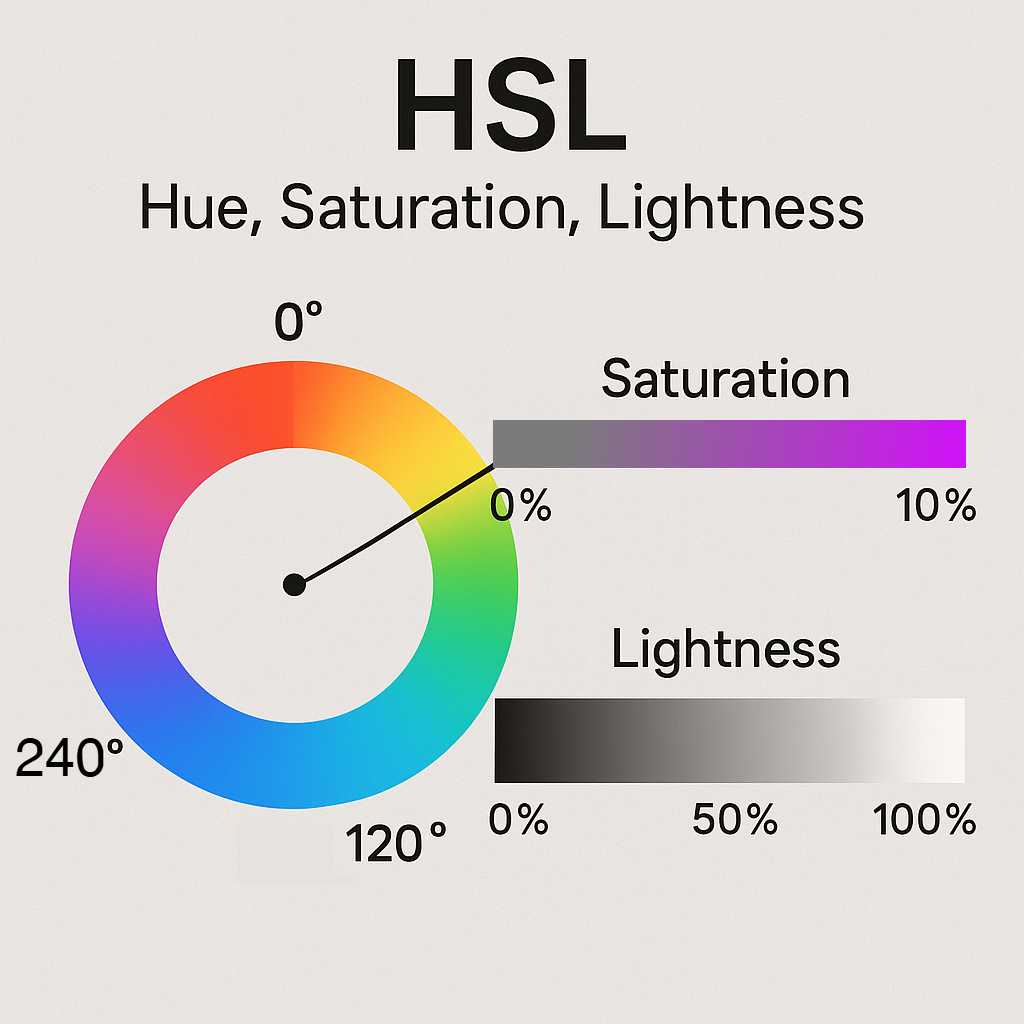
Understanding HSL in HTML and CSS: A Simpler Way to Think About Color
When working with colors in web design, you’ve probably encountered hexadecimal codes like#FF5733 or RGB values like rgb(255, 87, 51). While these are widely used, there’s another color model that can often make designing and adjusting colors much more intuitive: HSL.In this article, we’ll explore what HSL is, how it works in HTML and CSS, and why you might prefer it over other color formats.
What Is HSL?
HSL stands for Hue, Saturation, and Lightness. It’s a way of describing colors based on how we actually perceive them, rather than the raw red-green-blue components of a screen.- Hue: The type of color, represented as an angle on the color wheel (0–360 degrees). For example:
- 0° = Red
- 120° = Green
- 240° = Blue
- Saturation: How “vivid” or “washed out” the color is (0% = gray, 100% = full color).
- Lightness: How light or dark the color is (0% = black, 100% = white, 50% = “normal” brightness).
- Want a brighter version? Adjust lightness.
- Want a softer version? Adjust saturation.
- Want a completely different color? Rotate hue around the wheel.
Using HSL in CSS
In CSS, you can define colors using thehsl() function:/* A bright orange color */
color: hsl(30, 100%, 50%);
/* A muted blue */
color: hsl(210, 40%, 60%);The syntax is:
hsl(hue, saturation, lightness)Here’s what each part means:
- Hue: Angle in degrees (0–360).
- Saturation: Percentage (0%–100%).
- Lightness: Percentage (0%–100%).
Example: Changing Shades Easily
Let’s say you want several shades of the same base color:/* Base color */
color: hsl(200, 80%, 50%);
/* Lighter shade */
color: hsl(200, 80%, 70%);
/* Darker shade */
color: hsl(200, 80%, 30%);With hex or RGB, you’d have to calculate these new values manually. With HSL, you just tweak the lightness percentage.
Why Use HSL?
✅ More intuitive adjustments✅ Easier to create color palettes
✅ Great for dynamic theming (like changing hue on hover effects)
For example, in CSS you can create a hover effect by simply rotating the hue:
button {
  background-color: hsl(120, 60%, 50%);
}

button:hover {
  background-color: hsl(150, 60%, 50%);
}
This keeps the saturation and lightness constant, giving you a natural-looking variation.
Bonus: HSLA for Transparency
Like RGBA, HSL also supports an alpha channel for transparency:background-color: hsla(0, 100%, 50%, 0.5); /* semi-transparent red */The syntax is:
hsla(hue, saturation, lightness, alpha)Conclusion
HSL is a powerful and intuitive way to work with colors in HTML and CSS. It gives you fine-grained control over hue, saturation, and lightness, which makes creating and modifying color palettes much easier than traditional RGB or hex codes.Next time you’re designing a site or tweaking your CSS, try using HSL and see how much simpler it feels!