




Decision Trees
Decision Trees are a great way to display the right information to your users at the right time. Instead of having to have a conversation with someone by phone or email, you can automate the experience.
Examples of uses:
- A menu with many options and sub-options
- A troubleshooting guide to fixing a range of issues
- A complex guide that is just too unwieldy to show users all at once
A decision tree makes a beautiful experience for users.
So what does this look like for your users? First they are given a first set of options on a SharePoint page. They make a selection to see the next set of options. And so forth until there are no options left to choose from and we show the user a final message. Perhaps to enjoy their meal, or to fill in a form to escalate to the next level of support. Or to let them know that consents for submitting photos in the UK for use in advertising materials are valid for 5 years.
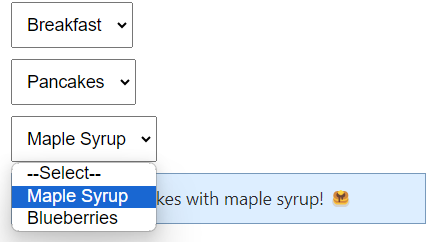
Take your user on a journey to get the exact data that they need to make a final decision.
And what does this look like for you to set this up? It's as simple as dragging and dropping. You can then preview your decision tree live.
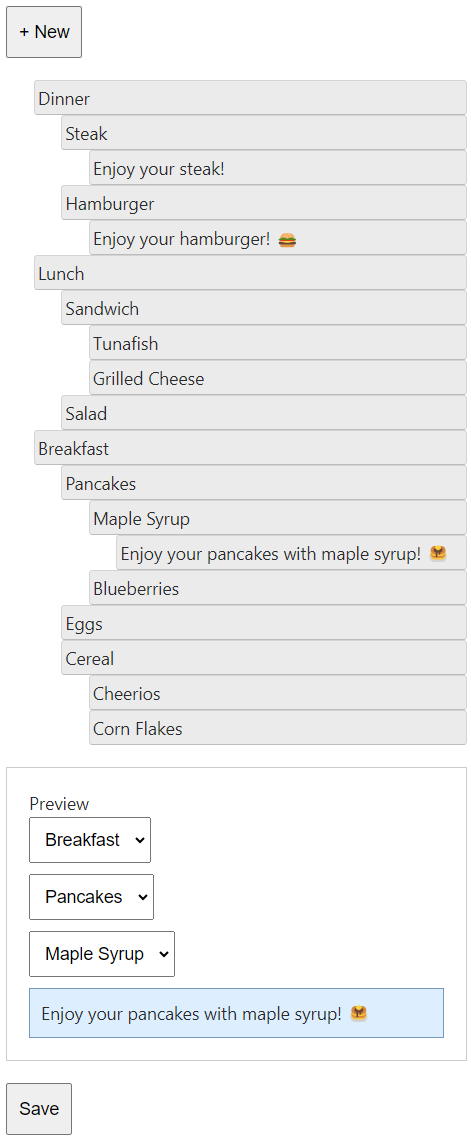
Then on a SharePoint page you add the Modern Script Editor web part with the below code:
<script src="/sites/yoursharepoint/js/jquery.min.js"></script>
<script src="/sites/yoursharepoint/decisiontree/decisiontree.js"></script>
<link rel="stylesheet" href="/sites/yoursharepoint/decisiontree/decisiontree.css">
<div decisiontreeid='LRPP' <!-- the unique ID of your decision tree -->></div>
<script>decisiontree();</script>
What do you think? Does this look interesting for you? Is this something you could use to save a lot of time? Book a call with Justin at https://automateofficework.com to get the right tools for you and your team.